Overview
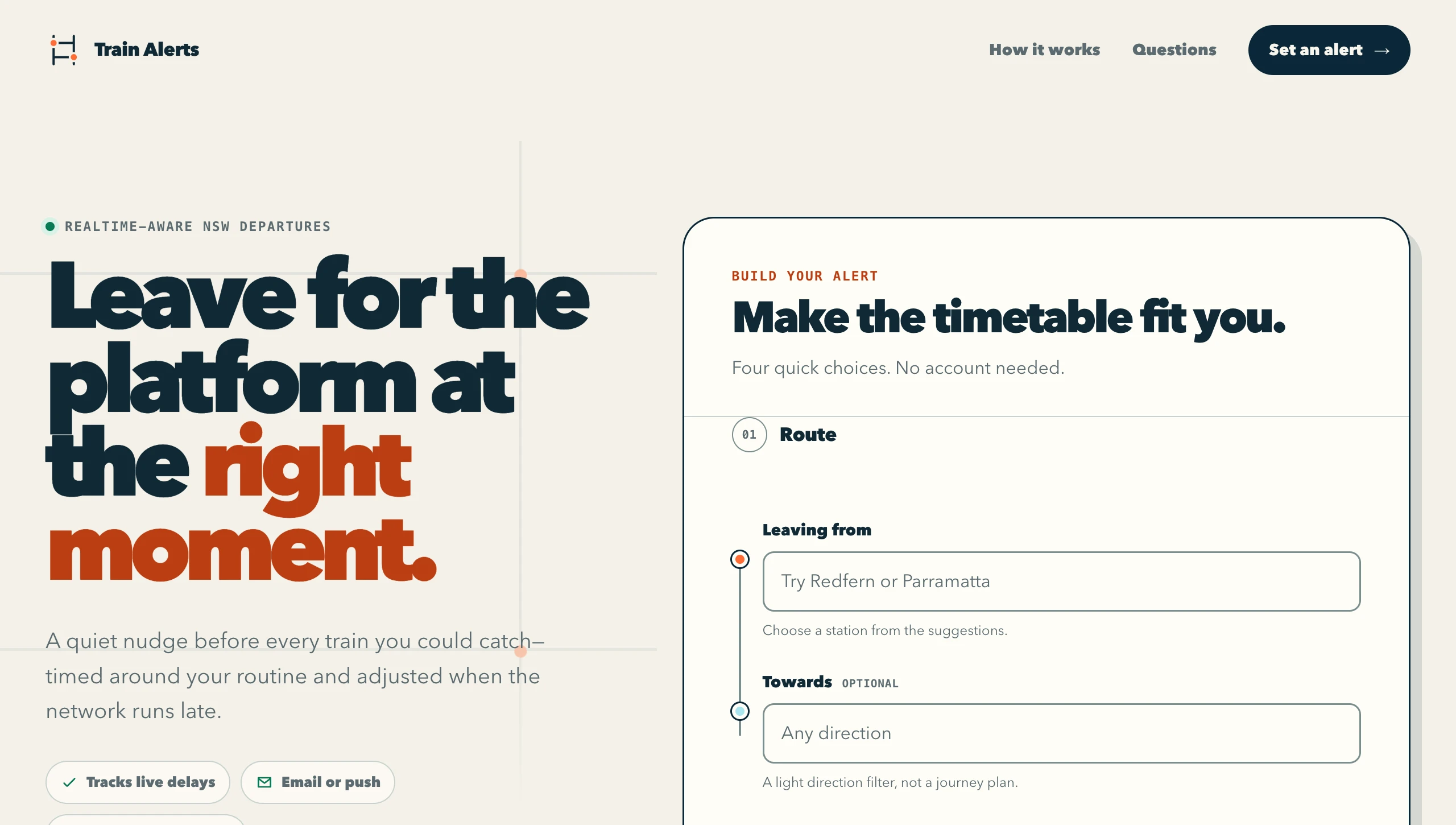
It's been nothing short of an exceptional first two months at Gyoza Flights! Jumping into the world of aviation has been super interesting and it has shifted my thinking as both an engineer and person. A recent example of this was the other day I was standing at Wynyard Station waiting for a train to Town Hall. My train of thought immediately drifted to origins and destinations. How my destination of Cronulla was all I really cared about and knowing when the next couple of trains would be departing. Sure I could go onto one of the various apps available and check but with my engineering brain I questioned if that was actually necessary. And did it cover what I really wanted? Sometimes I work back in the office, sometimes I leave early. I'm only in the office a few days a week and some of those are fortnightly. So as I stood and waited for my train an idea started to percolate. What if I just had a website where people could just choose an origin and destination, set a lead time, a window to receive the alerts, a type of alert (email or push notification) and then set and forget. Then they'd automatically get these alerts to their device and would be able to proactively determine when they should leave their office to make a train that suits what time they were thinking of leaving on that day. And that is how sydneytrainalerts.com was born.
I build on Cloudflare constantly and my tennis calendar is still quietly doing its thing from a Worker right now, so I had a fair idea of what was sitting there already. Then I remembered the alarm on Durable Objects, where a tiny stateful object can put itself to sleep and wake at an exact moment. That's precisely the shape of "ping me two minutes before each train", so that's what I built it on. You pick a station, how much notice you want, the days and window you travel in and whether you want the alert by push or email. From then on it watches the live departures and nudges you before each train you could catch. Once you're on, you tap "I'm on board" and it stays quiet until your next window.
How it works
The data comes from Transport for NSW's Open Data platform. Their Trip Planner API has a Departure Monitor endpoint that hands back the upcoming departures from a stop as plain JSON with the realtime estimates already merged in, so there's no GTFS protobuf wrangling at all. A second endpoint, Stop Finder, powers the station autocomplete on the form. The free tier gives you 60,000 calls a day which is heaps for a personal tool like this.
The part I really wanted to get right is the timing. Every alert is its own little Cloudflare Durable Object that watches your station through your travel window, follows the live delays and nudges you before each train you could catch. Once it's pinged you about one it lists the next couple behind it too, so if you miss the 5:12 you already know the 5:22 is coming. Getting that to actually work is the most interesting thing in the whole build, so I've given it its own section below.
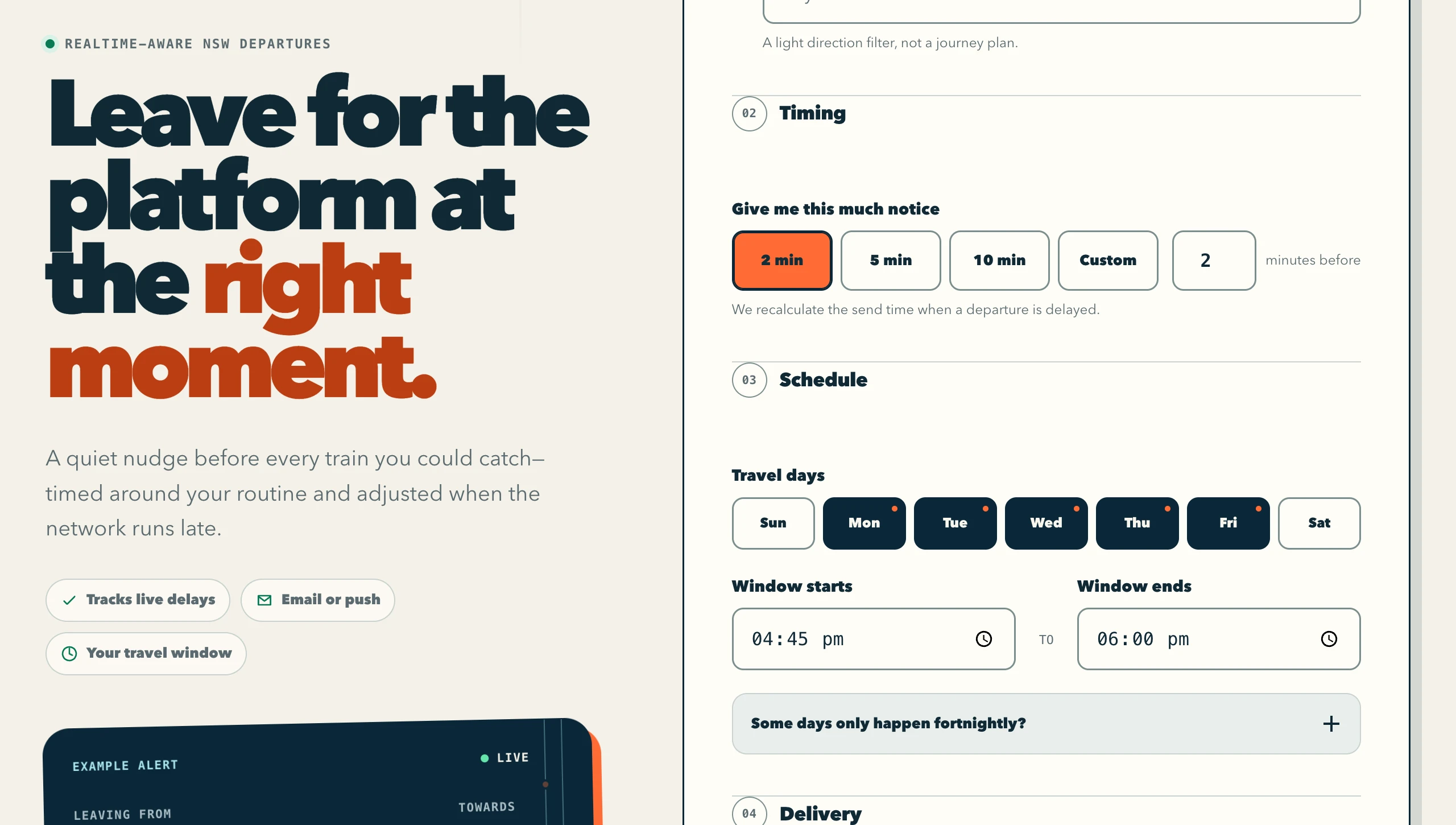
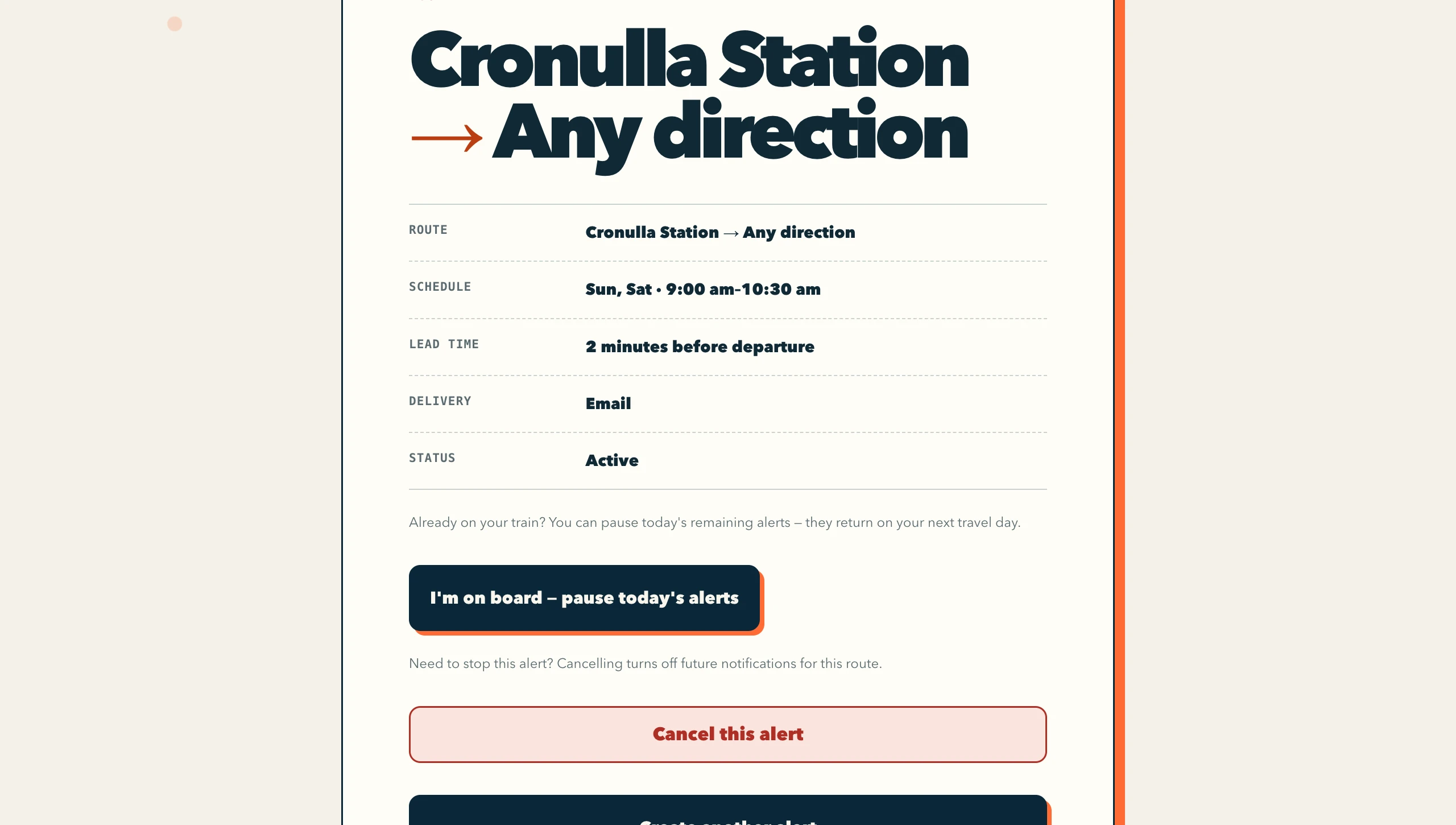
Schedules are Sydney wall-clock time with travel days, a start and end for the window and even fortnightly days for rosters that alternate. The subscriptions themselves live in a D1 database, which stays the source of truth. A cron fires every 15 minutes purely as a safety net so nothing gets stranded after a deploy. Once you're on your train you tap "I'm on board" and it goes quiet for the rest of that window, then picks back up on your next travel day. That pause sits on the manage page for every alert as well as on the notification itself.
One thing I had to be careful about is staying inside that free tier once more than a handful of people are using it. TfNSW's free plan also caps you at about 5 calls a second. It starts knocking requests back the moment you push past that. So the departure lookups run through Cloudflare's cache, keyed on the station and the minute. If ten people are all watching Town Hall at 5:31 they mostly land on the same cached answer instead of making ten separate calls. If TfNSW ever does rate-limit me the alerts back off and give it room instead of hammering away. I also sprinkle a bit of random jitter on the wake-ups so a deploy doesn't fire every alert at the same second and trip the limit myself. Since then I've added a counter in D1 that tallies every call that genuinely leaves for TfNSW, keyed on the Sydney day the quota actually resets on rather than UTC. It emails me as I cross 50, 75, 90 and 100% of the daily allowance. I'd rather find out I'm running hot from my inbox in the morning than from a window of alerts that quietly didn't go out. None of it is glamorous but it's what lets one free key quietly handle a proper crowd of commuters.
Delivery is push or email. Push is the default now and that swap was worth doing. An email subscriber costs a send for every matching train against a provider cap I share across both sites, where a push message costs nothing and skips the confirmation email entirely, because granting the browser permission is already proof you own the device. Push started out as the second radio button and unticked, so almost everyone was taking the expensive channel without ever thinking about it. The form still flips itself back to email on any browser where push isn't a single tap, uninstalled iPhone Safari especially, so nobody lands on an Add to Home Screen wall when they were just trying to fill in a form. Email goes through Resend with a manage link in every message so you can pause or cancel from the alert itself. If the push service ever reports a subscription as gone, the alert deactivates itself rather than pushing into the void forever. The frontend is one dependency-free page, no framework, with the autocomplete, a live preview of the alert you're building and a proper install walkthrough for iPhones, because iOS will only deliver web push to a site that's been added to the home screen. It started at about 2,000 lines and it's past 8,000 now. The Worker itself still only carries two runtime dependencies, Hono for the routing and the small Cloudflare helper that drives the rebuild container.
The thing I never planned on building was a second site. Ferries turn out to be the exact same problem with different nouns, so instead of forking the lot I made the mode a property of the request. The Worker reads the Host header, picks up the config for that brand and serves sydneyferryalerts.com off the same code, the same database and the same deploy as the trains site. That mode then gets stamped onto each subscription, because a Durable Object waking up on an alarm hours later has no request sitting there to read a hostname off. Everything that differs between the two lives in one config object, the brand and the homepage copy and whether you're waiting on a platform or a wharf. A third mode is one more entry in it.
The Cool Nerd Part
Right, this is the bit I actually get excited about. Before I committed to building it this way I sat down and properly grilled the design, because "give every single alert its own little server that never really sleeps" sounds mad when you first say it out loud. The more I poked at it though the more Durable Objects turned out to be the perfect fit, so let me walk through why.
The timing first. Your train is meant to leave at 5:12 so a two minute warning should fire at 5:10. Then it runs four minutes late and the warning needs to fire at 5:14 instead. The target keeps moving all afternoon. A Durable Object has this thing called an alarm, which is basically a single built-in timer the object can point at any exact moment in the future. Better still, it survives restarts and deploys. So every time the alert wakes up and checks the live departures it works out the new fire time from the latest estimate and re-points its own alarm at it. The 5:12 slips to 5:14 and the alarm slides right along with it. It's an alert that reschedules itself off the delay. A plain cron can't do that. The finest a cron will give you is once a minute, so you'd be waking every minute, pulling every subscription and still landing up to a minute wide of a target that won't sit still.
Then there's the fact that each alert is its own object with its own name. The trick with Durable Objects is that you address one by a string. I just use the subscription's id as that string. So wherever I am in the code, whether it's the subscribe request, the cancel button, the "I'm on board" tap or the safety-net cron, I hand it the same id and I'm always talking to the exact same object holding that one alert's state. No lookup table, no routing, no working out which server a subscription lives on. The id is the address. And because each object only ever holds its own alert, one person's alert going sideways can't touch anyone else's.
Here's the one that really sold me though. A Durable Object only ever does one thing at a time. It won't run two requests against the same object at once, it queues them up. That sounds like a small detail but it's the whole reason the tricky part of this app is even doable, which brings me to the messy bit.
A single wake-up isn't instant. The object has to go out over the network to TfNSW for the live departures. Then it has to actually send your push or your email. Both of those take real time. Now picture the alert half way through that, sitting there waiting on the departures to come back. Right at that moment you tap "cancel" or "I'm on board". Because the object does one thing at a time your tap can't barge in mid-step, but it does get its turn the instant the alert pauses to wait on the network. So it flips the state out from under the rest of the run. The alert wakes back up thinking everything's fine and, if I'm not careful, cheerfully sends you a notification for an alert you just cancelled.
The honest answer to that is a lot of little if-checks. The wake-up loop is peppered with early exits that all ask the same question in different spots: has this been cancelled or paused while I wasn't looking? Bail out if it has. There's one on the very first line before it does anything. There's one straight after the departures come back from TfNSW. There's one right before it sends each notification and another right after. There's even one tucked inside the final save, so if a cancel landed while the alert was mid-flight, the moment it goes to write "all done, wake me in 45 seconds" it checks one last time and just doesn't, because arming a fresh timer on an alert you've killed is exactly how you end up haunted by a cancelled alert that won't die. Cancelling also leaves a little durable marker behind, a tombstone, so the safety-net cron can't come past later, spot an alert with no timer set and helpfully resurrect the very thing you just deleted.
It's not the most elegant code I've ever written and there are more of those guards than I'd like. But every single one of them is a real race I could sit and describe to you. And the reason they get to be simple little if-blocks instead of a knot of locks is that one-thing-at-a-time promise. Without Durable Objects I'd be running one big loop over everyone's alerts, all of them fighting over the same database rows with a proper lock bolted on so a cancel and a poll couldn't clobber each other. With a Durable Object the isolation is the lock. Each alert ends up as a little self-winding alarm clock, chasing the train's live delay, costing nothing while it's asleep between your commutes and never fighting anyone for its own state, because it's the only thing that ever touches it.
Sticking points
The API that swore every station was invalid
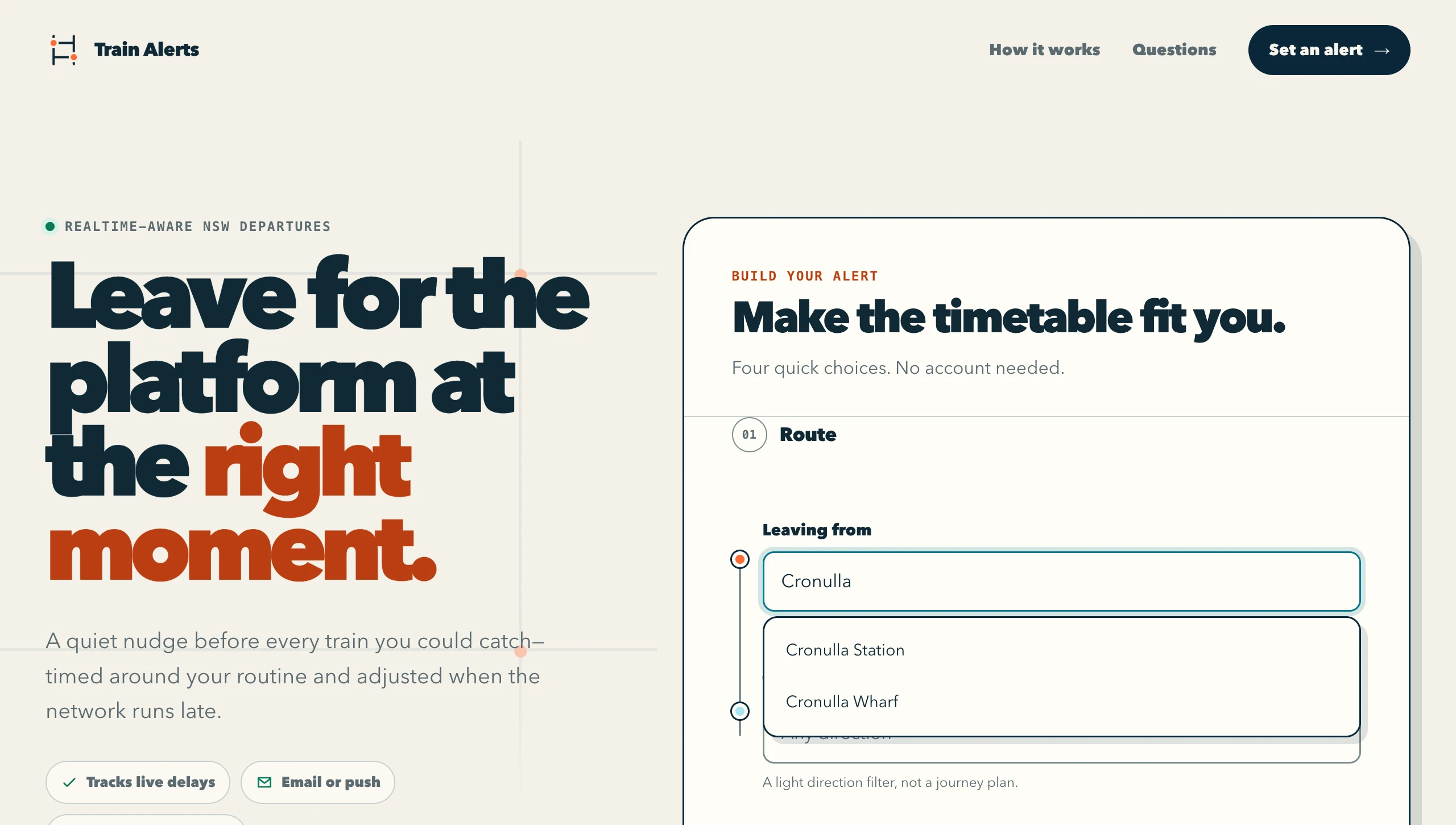
Early on the station search flat out refused to work. Every query came back with zero locations and a "stop invalid" message, even for Central. The culprit was one innocent looking parameter. Stop Finder takes a type_sf field and I'd set it to stop, because I was searching for stops. It turns out type_sf=stop actually means "the text I'm sending is a stop ID", so the broker was taking the word Cronulla and trying to look it up as a numeric station identifier. The fix was type_sf=any and then filtering the mixed bag of streets and points of interest down to actual stops. I only caught it because I verified the client against the live API instead of trusting the docs. The mock TfNSW server my Playwright tests drive now mirrors that exact broker behaviour, so this one can never quietly come back.
Daylight saving and the missing hour
Active windows are Sydney local time and my first version of "when does today's window start" was simple minute arithmetic from the current moment. An adversarial review pass over the whole codebase caught that the simple version drifts by exactly an hour whenever the calculation straddles the 2am daylight saving changeover, which in the worst case means a whole morning of missed alerts. The fix was to stop doing arithmetic and start constructing the actual Sydney wall time, using Intl with the Australia/Sydney timezone to check the guess and correct it. I reckon DST bugs are the sneakiest kind there is, because the broken code is provably correct for 363 days of the year.
The alert that sent people the wrong way
The "Towards" box is meant to be a light direction filter. Say you're leaving Town Hall heading home to Cronulla, you pop Cronulla in and the alert only bothers you about trains actually going your way. The catch is that a train only really tells you its final stop, so a service that passes through your destination on the way to somewhere else doesn't always say your stop's name. The filter would match nothing. My first version handled that by failing open, so when nothing matched it just alerted you about everything, on the theory that too many alerts beats none. That turned out to be genuinely annoying. On a quiet poll with no Cronulla train in sight it would happily ping me about trains heading the complete opposite way, up to Berowra and out to Emu Plains. The fix was to give the filter a memory. The first time a real matching train shows up it quietly notes that this direction does work here. From then on a poll with no match means go quiet, not alert about everything. It only falls back to the noisy everything-goes behaviour for a destination that has never once matched, which is the genuine can't-tell case. I still reckon failing open was the right instinct. It just shouldn't have been what happens every time. That felt like the end of it. It really wasn't.
Web push from scratch, byte for byte
The web push libraries everyone reaches for are built for Node and lean on APIs a Worker doesn't have. Rather than fight that, I wrote the push layer from scratch on WebCrypto. That means two RFCs. VAPID (RFC 8292), an ES256 signed JWT that proves to Apple's or Google's push service the message really came from my server. Then the payload encryption (RFC 8291), a chain of ECDH key agreement, HKDF derivations and AES-128-GCM. Hand rolling crypto is nerve-racking because the failure mode is silence, the push service just drops anything malformed and tells you nothing. The saving grace is that the encryption RFC ships a complete worked example with every intermediate value spelled out. So I made the encrypt function accept an injectable random seed and wrote a test that reproduces that worked example byte for byte. When it went green I knew the scariest part of the codebase was actually correct rather than just plausible.
The plot twist
So I shipped that direction fix and moved on, pretty pleased with myself. A few weeks later I finally sat down to put a number on how often the filter actually matched, which I'd never once measured. I pulled the real departure board for Town Hall on a Monday afternoon, 80 trains across the shipped default window, then checked it against six destinations a normal person would genuinely type in. Here's the twist. A headsign only ever tells you where a train finishes up. It says nothing at all about the twenty odd stations it calls at on the way there. Only 4 of those 80 trains terminate at Parramatta. 20 of them actually stop at Parramatta. So a Parramatta subscriber was being told about 4 trains a window and never hearing a whisper about the other 16. Hurstville was 5 against 15. My tidy little fail-closed fix wasn't filtering trains out at all, it was silently dropping trains those people could have caught. And because going quiet looks exactly the same as there being nothing to say, they'd never have a reason to suspect it.
The other branch was just as broken in the opposite direction. Redfern and Wynyard never match a headsign from Town Hall, not one of the 80, so the filter never got to learn that the direction works there and sat in the noisy everything-goes branch forever, pinging those subscribers 79 times a window. I widened the measurement out to 56 plausible Sydney destinations and depending where you start from only 30 to 45% of them are ever a headsign. Blacktown, Sutherland, Lidcombe, Bankstown, Museum, Wynyard and Redfern are all completely ordinary places to be heading home to and not one of them is a headsign from Town Hall. Both halves of my filter were wrong and they were wrong for the same reason. The signal was wrong. I'd spent two whole rounds carefully tuning what to do when the match failed. The actual bug was the question I was asking.
So the fix was to stop asking whether the destination is the last stop and start asking the only thing that actually matters. Does this train stop where I'm going? TfNSW's live departure board hands back a gtfsTripId on nearly every service and the static GTFS timetable carries the full calling pattern for every trip, so if those two join I get the real list of stations instead of a guess off the front of the train. They don't join directly, which took a whole investigation to establish. That id isn't a real trip id in any feed TfNSW publishes, not even the combined one. It isn't opaque either though. The route part of it reconstructs exactly to a route_id in the complete feed. Route plus origin station plus departure minute then pins the trip right down. 18 out of 18 live departures reconciled on the first proper run. That was a very good afternoon.
None of that fits on a Worker. The complete feed is 293 MB zipped and 1.45 GB extracted against a 128 MB isolate, so the heavy lifting started out on my laptop. A script pulled both feeds down, worked out the onward calling pattern for every trip and boiled the whole network into one small pattern shard per origin station, then published them into Workers KV. The first build came out at 247 stations and 18,090 trips indexed for about 7 MB all up. At alert time the Durable Object reads only its own station's shard, looks each departure up by route and minute and keeps the train if the destination is somewhere in what's left of its stop list. Everything hard gets resolved once, at build time, in code I can write proper tests against. The Worker ends up holding exactly one idea. The stations this service calls at after this one.
The genuinely nasty bit was through-running. Sydney Trains sends a lot of services straight through the City and the static timetable models the approach leg as a trip that terminates at Central, while the live board is already advertising the eventual destination. Read that literally and you get a false negative, which is worse than the thing I was replacing. GTFS has a block_id that links the trips worked by the same physical train. Sure enough the continuation leg leaves Central exactly one second after the approach leg arrives. Stitch the two and a trip that looked like it stopped at Central becomes the real 49 stop run. 1,671 of 1,671 Central-terminating trips on those lines had a block mate waiting for them. Without the stitching Cronulla would have gone from 5 alerts to 16, so it was required rather than a nice to have. I keyed the block on the service id as well as the block id too, because Sydney Trains reuses block ids across weekday and Saturday patterns whose join times happen to line up. That would have stamped a weekday timetable onto a Saturday train. A confident wrong yes, which is the worst kind, because nothing at runtime can catch it.
The rule I care about most in this whole thing is that absence is never a no. Destination missing from the shard, a schema version I don't recognise, the published dates running out, a KV read timing out, every one of those returns don't know and falls back to the old headsign matcher rather than deciding no. A wrong no is silent permanent non-delivery and that's the only failure in here a user can't recover from on their own. The acceptance run I was holding out for finally landed in a real weekday peak window, courtesy of a little scheduled job on my laptop taking the measurement at 4:52pm every weekday because I'm hardly ever at a keyboard at exactly the right minute. Town Hall came back with 80 out of 80 departures covered by the shards. My own Cronulla alert landed on 5 trains for the window, right where the earlier measurements said it should be. So I flipped it on. The stopping-pattern filter has been live for every train alert since early August and the rollback story is as boring as I could make it. Deleting the shard keys out of KV turns the whole thing off in seconds, no deploy needed. Ferries stay on the headsign path for now. Their wharf ids don't map into the ferry GTFS feed at all, which is a whole separate rabbit hole for another week.
The plot twist, solved for good
The laptop was never the long-term plan though. It was fine while I was proving the idea, running the build by hand in test runs and eyeballing the numbers before each publish, but I knew the whole time that if I wanted this to be properly automatic the build had to come off my machine and live in the cloud somewhere. A script that only runs when I remember to run it isn't automation.
The shards even gave me a deadline, because each one deliberately carries just eight days of timetable, today plus a week, so that a stale build degrades gracefully instead of serving wrong answers forever. Sure enough the build from the 3rd of August covered up to the 10th, so on the 11th every train alert quietly aged out of its shard and spent the whole day back on the old headsign matcher. Nothing broke, which is exactly how I designed it. Honestly that almost made it worse. Alerts kept arriving, just fewer of them. The canary I'd built to spot stale shards was only writing a line into a log I wasn't reading, so production ran thin all day before I rebuilt the shards by hand that evening. That was the nudge I needed to stop putting the move off.
My first thought for a cloud home was GitHub Actions and I went off it for two reasons. It would need a Cloudflare API token with write access to KV sitting in GitHub's secrets, a brand new credential to mint and then worry about forever. On top of that GitHub quietly switches off scheduled workflows when a repo goes inactive, which for a set-and-forget project is exactly the kind of silent stop I was trying to get rid of. Then I remembered Cloudflare had shipped Containers, where you attach a real Docker container to a Worker for the jobs an isolate can't handle. That was the lightbulb moment. The 1.45 GB extract that pushed this build onto my laptop in the first place stops mattering the moment the build gets a proper machine of its own.
Here's the bit I love about how Containers work. You address the container through a Durable Object. The same one-object-one-address idea that runs every alert in this app also runs the build machine. It only ever exists while it's working. A second cron in the same Worker fires once a day at midday and wakes the container. The container pulls both GTFS feeds down, chews through them with the exact same build code my laptop was running and hands the finished shards back over HTTP. Then comes my favourite part. The Worker writes the shards into KV itself through the binding it already owns, so the container never touches storage and holds no credentials at all. Automating the whole pipeline added zero new secrets anywhere. The first deploy did bounce because Containers need the paid Workers plan, so this project now costs me five dollars a month plus about five cents of actual container time. For a build that runs itself every day, I reckon that's a bargain.
Then the very first end-to-end run failed and honestly I couldn't have asked for a better failure. The build indexed 9,133 trips where the previous day's run had found over 20,000, so one of the assertion gates I'd wired through the pipeline looked at that number and refused to publish. The investigation turned up something I'd never have guessed. The two TfNSW feeds run on completely different clocks. The Sydney Trains operator feed regenerates at about 1am every morning like clockwork. The complete feed only republishes when something changes and I caught it nearly seven hours stale that morning, with one past incident lagging almost 44 hours. The trip ids carry a day counter that ticks up with each generation, so whenever the two feeds sit a generation apart the join between them collapses and half the trips silently fall out of the build.
Two things came out of that. The daily rebuild moved from the small hours to midday, well clear of that 1am regeneration. And the gate itself went from box-ticking to being the hero of the story, because publishing that half-empty bundle would have been far worse than publishing nothing. A trip that's missing from the shard doesn't look missing at match time. It looks like a train that doesn't stop where you're going, which is the silent non-delivery I'd already ranked as the one unforgivable failure in this system. So here's a tip if you're building a pipeline whose output other code will trust. Give the build a gate on its own numbers and let it refuse loudly. Mine caught a genuine upstream problem on its very first run and the old shards simply kept serving until the feeds caught back up to each other.
The last piece was making sure every failure lands in my inbox rather than a log, since a log-only canary had already burned me once. The staleness canary emails me now. A failed rebuild emails me too, naming the gate that tripped and the number it measured. Ops emails are capped at one a day so a bad week can't bury me. Best of all, every one of those emails carries the actual fix inside it, a curl command against a new authenticated admin route that kicks off a rebuild on demand. There's a fun Workers quirk in that route too. A Worker only gets about 30 seconds of background time after it responds, nowhere near enough for this build, but there's no wall-clock limit while the client stays connected. So the route just holds the connection open until the build finishes and then answers with the result.
That admin route is exactly how the first real production rebuild ran. It published 239 station shards, swept up 8 stale ones an older build had left behind and came back in 67 seconds. That number was its own little lesson too, because every estimate along the way had confidently said the build takes about ten minutes. The very last pull request in this whole saga was me going back through the emails and docs to correct that claim to what production actually measured. So the timer on this feature is no longer wound by hand. I reckon that's the real finish line for a side project like this, the moment it keeps working when you're not looking at it.
The result
I couldn't be happier with how this one came out! The first build took a couple of days with Claude Code alongside me and it's grown up a fair bit since it went live. The caching that keeps it inside the free tier, the ferry site, the whole stopping-pattern rework and the daily container rebuild that keeps its timetable data fresh all landed after real people started using it, which is by far the best way to find that sort of thing. My phone buzzes two minutes before the train actually leaves, the alert already knows it's running late and one tap on "I'm on board" keeps everything quiet until my next travel day. I don't open the app, I don't refresh anything and I've stopped standing on platforms waiting. It's all covered end to end, Vitest across the schedule and crypto logic and Playwright driving the real Worker against a mock TfNSW upstream, so I can keep tweaking it without holding my breath. It's live at sydneytrainalerts.com, so if you're a Sydney commuter you're welcome to set one up of your own. There's a blog on each site too, nine posts apiece, to help people find them.
Two things I'd pass on from this one. If you've built yourself a heuristic and you're onto your second round of tuning what it should do when it misses, stop and go measure how often the thing actually hits. Mine was landing 30 to 45% of the time and I'd never checked it once. Then if you're thinking about doing web push yourself, here's the tip I wish I'd had on day one. Don't test your encryption by firing real notifications and hoping. Make the random inputs injectable and verify your output against the worked example in RFC 8291 first, because the push services silently drop anything malformed and you'll get no clue why. Once that test passes, everything downstream is just plumbing. Happy coding!